How to Track Your Net Worth in Google Sheets (Free Template)
Net worth tracker for Google Sheets. Track assets, liabilities, and monthly progress in 15 minutes. Get the template.

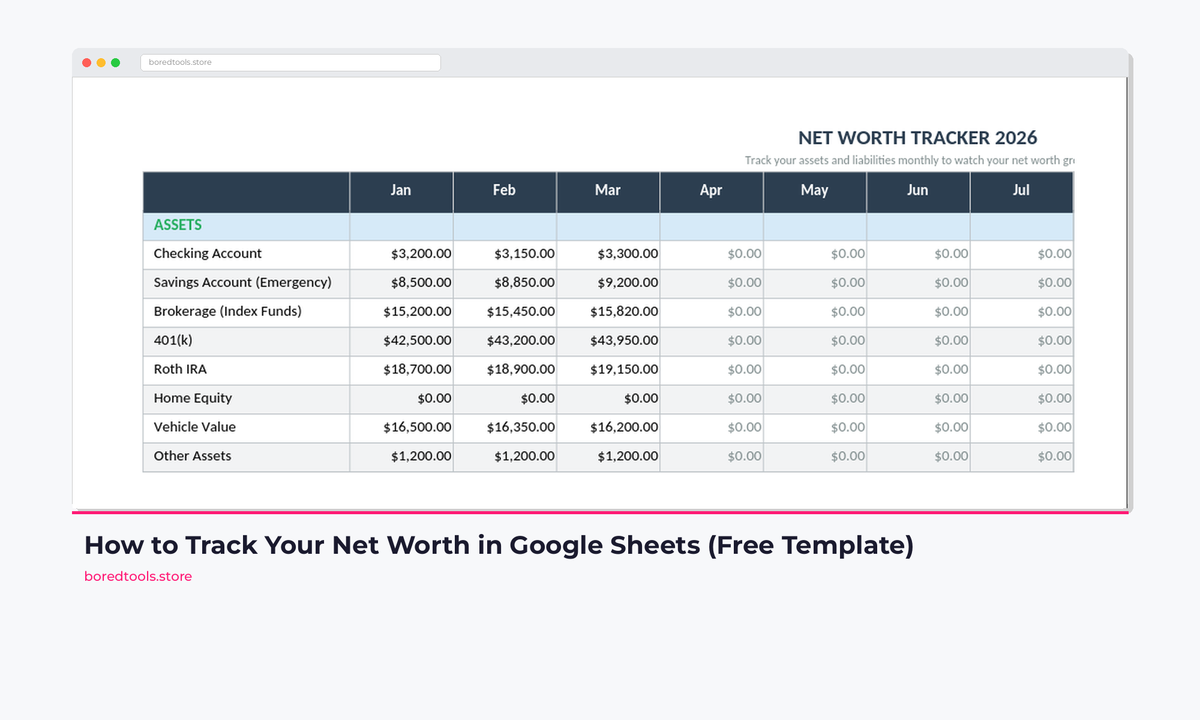
Your bank balance tells you how much cash you have today. Your net worth tells you whether you're actually building wealth or just treading water.
Net worth = what you own minus what you owe. Track it monthly and that single number becomes the most motivating financial habit you'll build. Budgeting feels like restriction. Watching your net worth grow month after month feels like progress you can see.
This guide shows you how to build a net worth tracker in Google Sheets from scratch. And if you'd rather skip the build and get straight to the numbers, the Budget Dashboard 2026 has a built-in net worth tracker alongside monthly budgeting, debt payoff, and savings goal tracking. One spreadsheet, everything wired together. Grab it for $7.99 on Payhip →
Why Track Net Worth?
Most people fixate on income. "I got a raise." "I made more this year." But income doesn't mean wealth. Plenty of people earning £80,000 have a negative net worth because of student loans, car finance, and credit card debt stacking up quietly in the background.
Net worth cuts through all of that. It's one number that answers: am I richer or poorer than last month?
Here's what monthly tracking actually does for you:
- Reveals hidden progress. You might feel broke, but if your pension contributions grew by £400 and your student loan dropped by £200, your net worth went up £600 that month.
- Exposes lifestyle creep. If your income went up £500/month but your net worth didn't move, the money is leaking somewhere.
- Motivates long-term thinking. Watching a line go up and to the right over 12 months changes your relationship with money more than any budgeting app.
- Makes big decisions clearer. Should you buy that car on finance? Check how it hits your net worth. A £25,000 liability is easier to evaluate when you see the full picture.
What to Include in Your Net Worth
Assets (What You Own)
Liquid assets are things you can turn into cash quickly:
- Current account balances
- Savings accounts
- ISAs (Cash and Stocks & Shares)
- Investment accounts (brokerage, index funds, ETFs)
- Cash on hand
Retirement accounts:
- Workplace pension (get your latest statement; log in to your provider's portal)
- SIPP or personal pension
- State pension isn't counted here. You can't cash it out
Property:
- Home value (use Zoopla or Rightmove estimates; update quarterly, not monthly)
- Rental property value
- Land
Other assets:
- Car (check AutoTrader for current value; cars depreciate, so be honest)
- Valuable items (only if you'd actually sell them: jewellery, watches, collectibles)
- Crypto holdings (use current market value)
- Money owed to you (only if you genuinely expect repayment)
Liabilities (What You Owe)
- Mortgage balance
- Student loan balance
- Car finance (PCP, HP, or loan)
- Credit card balances
- Personal loans
- Buy Now Pay Later balances (Klarna, Clearpay, etc.)
- Money you owe others
- Any other debt
Building the Tracker in Google Sheets
Step 1: Set Up the Assets Section
Create a new Google Sheet. In the first tab, name it "Net Worth" and set up your assets:
| A | B | |
|---|---|---|
| 1 | NET WORTH TRACKER | |
| 2 | Last updated: | March 2026 |
| 3 | ||
| 4 | ASSETS | Amount |
| 5 | Current Account | 2,450 |
| 6 | Savings Account | 8,300 |
| 7 | Stocks & Shares ISA | 14,200 |
| 8 | Workplace Pension | 31,500 |
| 9 | Home Value | 285,000 |
| 10 | Car Value | 6,800 |
| 11 | Crypto | 1,200 |
| 12 | Total Assets | =SUM(B5:B11) |
Customise the categories to match your actual accounts. Delete rows you don't need. Add rows for accounts I haven't listed. The specifics don't matter. What matters is capturing everything.
Step 2: Add the Liabilities Section
Below your assets, add your debts:
| A | B | |
|---|---|---|
| 14 | LIABILITIES | Amount |
| 15 | Mortgage | 215,000 |
| 16 | Student Loan | 28,400 |
| 17 | Car Finance | 4,200 |
| 18 | Credit Card | 1,800 |
| 19 | Total Liabilities | =SUM(B15:B18) |
Step 3: Calculate Net Worth
Below both sections:
| A | B | |
|---|---|---|
| 21 | NET WORTH | =B12-B19 |

Assets minus liabilities in one cell. This is the number that tells you whether you're building wealth or treading water.
That formula is your entire financial life in one cell. Assets minus liabilities.
For the example numbers above: £349,450 in assets minus £249,400 in liabilities = £100,050 net worth.
Want that already built for you, with charts, debt tracking, and savings goals wired in? The Budget Dashboard 2026 does all of it. It's the spreadsheet I'd build if I had a weekend and no patience for fiddling. Get it for $7.99 →
Step 4: Build the Monthly History Tab
This is where the real value lives. Create a second tab called "History" and set it up like this:
| A | B | C | D | E | |
|---|---|---|---|---|---|
| 1 | Month | Assets | Liabilities | Net Worth | Change |
| 2 | Jan 2026 | 340,200 | 251,800 | 88,400 | . |
| 3 | Feb 2026 | 344,900 | 250,600 | 94,300 | +5,900 |
| 4 | Mar 2026 | 349,450 | 249,400 | 100,050 | +5,750 |
The "Change" column formula (starting in E3):
=D3-D2
Each month, add one row. Update the amounts on your main tracker tab, then copy the totals here. Five minutes per month. That's it.
Step 5: Add the Chart
Select columns A and D (Month and Net Worth) from your History tab, then:
- Insert → Chart
- Choose Line chart
- Title it "Net Worth Over Time"

After a few months of data, the line chart makes your progress impossible to ignore.
After 6+ months of data, watching that line climb becomes addictive in the best possible way. Some people screenshot it monthly and keep a folder. Sounds obsessive. Works completely.
For a fuller picture, check out the Budget Dashboard 2026 overview to see everything the spreadsheet tracks alongside your net worth.
How Often to Update
Monthly is the right frequency for most people. Pick a specific day. The 1st of each month works well. Block 15 minutes.
Here's the update process:
- Log into each bank/pension/investment account
- Note the current balance
- Update the amounts on your Net Worth tab
- Copy the totals to your History tab
- Look at the chart and feel something
Don't update weekly. Markets move around constantly, and short-term noise will stress you out for no reason. Monthly smooths out the volatility and shows the real trend.
Don't update quarterly either. That's too infrequent to build the habit. Monthly creates a rhythm.
What to Do When Your Net Worth Drops
It will happen. Market downturns, unexpected car repairs, medical bills. Life happens.
Don't panic. A single month's drop means nothing. Look at the 6-month trend.
Identify the cause. Was it market-driven (your investments dipped)? That'll recover. Was it spending-driven (you put a holiday on credit)? That needs attention.
Focus on what you control. You can't control the stock market. You can control your savings rate, your debt payments, and your spending. Net worth tracking helps you separate the two clearly. And if debt is the culprit, the debt payoff calculator shows you exactly how fast you can knock it down using snowball or avalanche.
Pro Tips
Include your partner. If you share finances, combine everything into one tracker. Your household net worth is more meaningful than individual calculations for shared goals like buying a home.
Don't obsess over home value. Update it once per quarter using Zoopla estimates. Monthly house price fluctuations are noise.
Track percentages, not just pounds. A £5,000 increase when your net worth is £50,000 is a 10% jump. The same £5,000 at £500,000 is 1%. Context matters.
Exclude depreciating assets if you want. Some people don't count their car because it loses value every month. Either approach works. Just be consistent.
Celebrate milestones. First positive net worth. First £10K. First £50K. First £100K. These take years to hit, and they deserve recognition.
Related Reads
- Budget Dashboard 2026: Full Spreadsheet Overview
- FIRE Spreadsheet: Track Your Path to Financial Independence
- Debt Payoff Calculator: Snowball vs Avalanche Method
Get Started
Net worth tracking works best alongside proper budgeting. Knowing your net worth is growing is good. Knowing why it's growing (which budget categories you're winning at, which ones are draining you) is better.
The Budget Dashboard 2026 covers both. It's a UK-built spreadsheet with HMRC Self Assessment categories, council tax tracking, National Insurance calculations, ISA allowances, and GBP formatting throughout. US edition included with IRS tax brackets, 401(k) tracking, and USD formatting. One purchase, both editions.
Get the Budget Dashboard 2026 for $7.99 on Payhip →
The important thing is to start. Wherever your number is today, it's your starting line.
Get free spreadsheet templates and updates. New templates, feature updates, and practical guides delivered to your inbox. No spam, unsubscribe anytime.
Subscribe free → | Already have a template? Download the free budget tracker or free meal planner. No email required.
Choose the right next step
Need a simple budget tracker spreadsheet? Start with the Free Budget Tracker. Use Budget Dashboard 2026 when you want budgets, debt, savings and net worth in one workbook. Choose the Complete Collection when several parts of life admin need sorting.