Bill Tracker Spreadsheet: Never Miss a Payment or Late Fee Again
Bill tracker spreadsheet for Google Sheets to manage every recurring payment and stop paying late fees. Get the template.

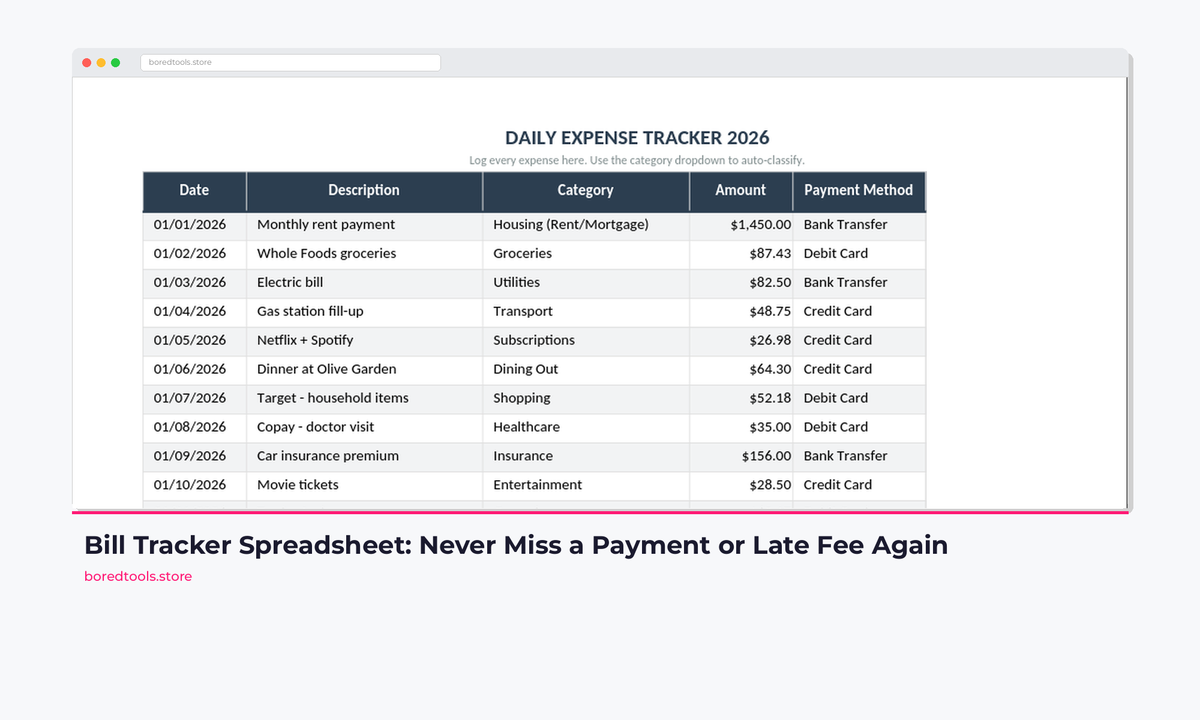
The average UK adult juggles 12 to 15 recurring bills every month. Council tax, broadband, mobile, energy, water, insurance, streaming services, gym memberships. The list keeps growing. A solid bill tracker spreadsheet is the difference between staying on top of all of them and haemorrhaging money to late fees.
Miss one payment and you're looking at a £10 to £35 late fee. Miss three across different accounts and that's £100+ in penalties over a quarter. Money that buys you nothing. Add the credit score damage from missed payments (which stays on your file for six years in the UK), and a simple tracking problem becomes an expensive one fast.
Here's how to build a system that prevents all of it. Or skip the build and grab the Budget Dashboard 2026 on Payhip ($7.99) →. Bill tracker, annual calendar, paycheck alignment, and sinking fund calculator already wired together.
Why Calendar Reminders Aren't Enough
Most people start with calendar alerts. "Council tax due on the 1st." "Car insurance on the 15th." Seems logical. But calendar reminders fail in four specific ways:
They don't show total monthly commitment. You might know each bill individually, but do you know your fixed outgoings total £1,847/month? Calendar reminders are isolated events. They can't tell you whether bills eat 55% or 75% of your take-home pay.
They don't track payment confirmation. A reminder tells you a bill is due. It doesn't confirm you actually paid it. Did the direct debit go through? Did you manually pay the one that isn't on auto-pay? Two weeks later, you can't remember.
They can't flag annual bills that sneak up. Car insurance renewal, TV licence, Amazon Prime annual, home insurance. These arrive once a year and always feel like a surprise. A December reminder for a January renewal gives you 30 days to find £400. A tracker that shows it every month gives you 12 months to prepare.
They can't align bills to paychecks. If you get paid on the 25th and £900 in bills land between the 1st and the 5th, you need to know that before the month starts. Calendar reminders don't group bills by paycheck cycle.
A bill tracker spreadsheet solves all four problems. Want it pre-built? The Budget Dashboard 2026 has a full bill tracking system ready to go.
The Bill Tracking Framework
Before opening a spreadsheet, understand the four layers of effective bill tracking:
1. Master Bill List with Due Dates
Every single recurring payment, no matter how small. The £3.99 iCloud storage. The £1/month bank account fee. Everything. Most people undercount their bills by 4 to 6 items because they forget the small ones.
2. Payment Status Tracking
A monthly grid where you mark each bill as paid, pending, or overdue. This is the layer most people skip. And the one that actually prevents late fees.
3. Annual Cost View
Monthly bills are easy to understand. But what does each bill cost you per year? That £49.99/month gym membership is £600/year. Seeing annual totals forces honest conversations about whether each bill earns its place.
4. Bill-to-Paycheck Alignment
Which bills land between which paychecks? If you're paid on the 15th and 30th, you need two separate "bill windows." They need to roughly balance, or one paycheck does all the heavy lifting while the other feels like free money. It isn't.
Building a Bill Tracker in Google Sheets
Here's the step-by-step setup. Takes about 20 minutes and saves you hours of stress every month.
Step 1: Create the Master Bill List
Open a new Google Sheet and build your bill inventory:
| A | B | C | D | E | F | G | |
|---|---|---|---|---|---|---|---|
| 1 | Bill Name | Amount | Due Date | Frequency | Payment Method | Auto-Pay | Annual Cost |
| 2 | Council Tax | 156.00 | 1st | Monthly (10 mo) | Direct Debit | Yes | =B2*10 |
| 3 | Rent/Mortgage | 1,100.00 | 1st | Monthly | Standing Order | Yes | =B3*12 |
| 4 | Energy (gas + electric) | 142.00 | 5th | Monthly | Direct Debit | Yes | =B4*12 |
| 5 | Water | 38.00 | 5th | Monthly | Direct Debit | Yes | =B5*12 |
| 6 | Broadband | 32.99 | 12th | Monthly | Direct Debit | Yes | =B6*12 |
| 7 | Mobile Phone | 24.99 | 15th | Monthly | Direct Debit | Yes | =B7*12 |
| 8 | Car Insurance | 486.00 | 15 Mar | Annual | Card | No | =B8 |
| 9 | TV Licence | 169.50 | 1 Apr | Annual | Direct Debit | Yes | =B9 |
| 10 | Netflix | 10.99 | 22nd | Monthly | Card | Yes | =B10*12 |
| 11 | Gym | 29.99 | 1st | Monthly | Direct Debit | Yes | =B11*12 |
Frequency formulas for column G (Annual Cost):
- Monthly bills:
=B2*12 - Quarterly bills:
=B2*4 - Annual bills:
=B2 - Council tax (10 months):
=B2*10
At the bottom, add a total: =SUM(G2:G50). This number is your true annual bill commitment. For most UK households, it lands between £12,000 and £22,000. Seeing it in one place is usually a wake-up call.
Step 2: Build the Monthly Payment Tracker
Create a new tab called "Monthly Tracker." This is where you confirm each bill is actually paid.
| A | B | C | D | E | |
|---|---|---|---|---|---|
| 1 | Bill Name | Due Date | Amount | Status | Date Paid |
| 2 | Council Tax | 1st | 156.00 | Paid | 01/03/2026 |
| 3 | Rent | 1st | 1,100.00 | Paid | 01/03/2026 |
| 4 | Energy | 5th | 142.00 | Pending | |
| 5 | Water | 5th | 38.00 | Pending |
Use Data Validation on the Status column (D) to create a dropdown with three options: Paid, Pending, Overdue. Then add conditional formatting:
- Paid = green background
- Pending = yellow background
- Overdue = red background
Duplicate this tab at the start of each month. Rename it "Mar 2026," "Apr 2026," and so on. Each month starts with every bill set to "Pending" and you mark them off as they clear.
Step 3: Add the Paycheck Alignment View
If you're paid monthly on the 25th, list your bills in due-date order and add a running total:
| A | B | C | |
|---|---|---|---|
| 1 | Bill | Amount | Running Total |
| 2 | Rent (1st) | 1,100.00 | 1,100.00 |
| 3 | Council Tax (1st) | 156.00 | 1,256.00 |
| 4 | Gym (1st) | 29.99 | 1,285.99 |
| 5 | Energy (5th) | 142.00 | 1,427.99 |
| 6 | Broadband (12th) | 32.99 | 1,460.98 |
| 7 | Mobile (15th) | 24.99 | 1,485.97 |
| 8 | Netflix (22nd) | 10.99 | 1,496.96 |
This shows you exactly how much needs to be in your account on any given day of the month. If your take-home pay is £2,800 and £1,497 is committed to bills by the 22nd, you've got £1,303 for everything else. Food, transport, savings, spending money.
For those paid fortnightly or biweekly, split the view into two pay periods and make sure each one covers its bills with margin.
If you'd rather not build this from scratch, the Budget Dashboard 2026 has the paycheck alignment view, sinking fund calculator, and monthly tracker all pre-built. Get it for $7.99 on Payhip →
Step 4: Add Alerts for Annual Bills
Create a "Annual Calendar" tab with a 12-month grid:
| Month | Bills Due | Total |
|---|---|---|
| January | TV Licence (£169.50) | £169.50 |
| February | . | £0 |
| March | Car Insurance (£486) | £486.00 |
| April | Council Tax rate change | Review |
| May | . | £0 |
| June | Home Insurance (£320) | £320.00 |
| July | Car MOT + Service (~£350) | £350.00 |
| August | . | £0 |
| September | . | £0 |
| October | . | £0 |
| November | Amazon Prime (£95) | £95.00 |
| December | . | £0 |
Total annual one-off bills in this example: £1,420.50. Divided by 12, that's £118/month you should be setting aside into a bills sinking fund so none of these feel like emergencies.
Bill Tracker Spreadsheet vs Other Approaches
A spreadsheet isn't the only option. Here are the main approaches, honestly evaluated.
1. Calendar Alerts (Google Calendar, Apple Calendar)
Platform: Any calendar app
Price: Free
Pros: Zero setup. Already on your phone. Sends push notifications.
Cons: No payment confirmation. No total view. Annual bills get lost in the noise. Can't show running totals or paycheck alignment.
Verdict: Fine as a backup reminder, useless as your primary system. You'll still miss payments when life gets busy and you swipe away a notification at the wrong moment.
2. Banking App Notifications
Platform: Monzo, Starling, Chase, most high-street banking apps
Price: Free with account
Pros: Automatic. Shows upcoming direct debits. Monzo and Starling predict your "left to spend" after committed bills. No manual data entry.
Cons: Only tracks bills paid from that one account. If you use multiple accounts or credit cards for different bills, you get a partial picture. Can't track bills paid by card or cash. No annual view.
Verdict: Excellent complement to a tracker, not a replacement. Monzo's "committed spending" feature is genuinely useful. But it won't catch the car insurance you pay annually on a credit card.
3. Bill Tracking Apps (Prism, BillMinder)
Platform: iOS and Android
Price: Free (Prism), £2.99 (BillMinder)
Pros: Purpose-built. Push notifications before due dates. Some connect to billers directly and show actual amounts. BillMinder has a calendar view that's genuinely good.
Cons: Prism shut down its UK support in 2024. US only now. BillMinder requires manual entry for most UK billers. Data lives in someone else's app. If they shut down or change pricing, you start over. Limited export options.
Verdict: BillMinder is decent for iPhone users who want reminders without a spreadsheet. But you're trusting a small app developer with your financial routine. A spreadsheet you control can't disappear overnight.
4. Spreadsheet Tracker (Google Sheets / Excel)
Platform: Google Sheets, Excel, LibreOffice
Price: Free
Pros: Complete control. Customise columns, formulas, and views to match exactly how you think. See total commitments, annual costs, paycheck alignment. All in one place. Data is yours forever. Easy to share with a partner.
Cons: Manual setup (20 to 30 minutes). Requires you to mark bills as paid each month. No push notifications unless you add a Google Apps Script (another 10 minutes).
Verdict: Best option for anyone who wants full visibility into their bills. The manual payment tracking is actually a feature. It forces you to confirm each bill cleared, which is how you catch errors and fraudulent charges.
5. Budgeting Software (YNAB, Goodbudget)
Platform: Web, iOS, Android
Price: YNAB $14.99/month (~£12); Goodbudget free tier available
Pros: Bill tracking is one feature within a full budgeting system. YNAB handles recurring transactions and goals natively. Account syncing means less manual entry.
Cons: Expensive. YNAB costs £144/year, which is ironic for a budgeting tool. Overkill if you only need bill tracking. Goodbudget's free tier limits you to 10 "envelopes" and one account. Learning curve is real. YNAB takes 2 to 3 months before it clicks.
Verdict: If you already use YNAB for budgeting, its bill tracking is solid. But subscribing to YNAB just to track bills is like buying a Swiss Army knife to open letters. A spreadsheet does the job for £0.
The Annual Bill Calendar: Finding the Danger Months
Most financial stress comes from bill clustering. Months where multiple annual or quarterly payments overlap. April is notorious in the UK: council tax rates change, road tax might be due, and several insurance policies renew after the new tax year.
Build your annual calendar and look for clusters. Common UK pinch points:
January to February: Post-Christmas cash flow is tight. TV Licence often falls here. Energy bills peak with winter usage.
March to April: Car insurance and road tax renewals are common. Council tax rate change means your monthly amount shifts. Water bills sometimes adjust.
September to October: Car MOT and service if you bought in autumn. Home insurance renewals cluster here. Back-to-school costs if you have children.
December: The obvious one. Also: many annual subscriptions renew in December or January if you signed up during Black Friday deals the previous year.
Once you spot the clusters, you have two options: call providers and ask to move payment dates to spread the load, or build a sinking fund that accumulates £100 to £150/month specifically for annual bills. If you want help tracking subscriptions that are silently draining your budget, the Subscription Tracker Spreadsheet is worth a look alongside this.
Setting Up a Bills Sinking Fund
A sinking fund is money you set aside monthly for bills that arrive less frequently than monthly. The formula:
Total annual one-off bills / 12 = monthly sinking fund contribution
If your annual bills total £1,800, set aside £150/month into a separate savings pot. Monzo and Starling make this trivially easy with their pot features. When car insurance arrives as a £500 lump sum in March, the money is already sitting there. No scramble. No credit card. No stress.
This is the single highest-impact habit you can build alongside a bill tracker. The tracker tells you what's coming. The sinking fund ensures you can pay it. For a ready-made template that combines both, see the Sinking Funds Spreadsheet Template.
Automating Where It Makes Sense
Set up direct debits or auto-pay for every bill that allows it. In the UK, direct debit also gives you protection under the Direct Debit Guarantee. If a company takes the wrong amount, your bank must refund you immediately.
Bills worth automating:
- Council tax
- Energy
- Water
- Broadband and mobile
- Insurance premiums (monthly)
- Streaming services
- Gym membership
Bills worth paying manually:
- Annual insurance renewals. Always compare quotes before renewing, so auto-pay here means you skip the comparison step and overpay.
- Any bill where the amount varies significantly month to month and you want to review before paying.
- Credit card bills. Pay manually so you review the statement and catch fraudulent charges.
In your tracker, mark the Auto-Pay column for each bill. Your monthly review then focuses only on the manual-pay bills. The ones that actually need your attention.
Get the Template
You can build everything above from scratch, or start with a template that has the structure already in place.
The Budget Dashboard 2026 on Payhip ($7.99) → has the full system: bill tracker, annual calendar, paycheck alignment view, sinking fund calculator, monthly budgeting, and savings goals. All wired together in one workbook. Enter your bills once and the dashboard handles the rest.
UK edition built for British finances. HMRC Self Assessment categories, council tax tracking, National Insurance (Class 2 and Class 4) calculations, ISA allowances, and GBP formatting throughout. US edition included with IRS tax brackets, 401(k) tracking, and USD formatting.
Related Reads
- Subscription Tracker Spreadsheet: Find and Cut Wasteful Recurring Charges
- Sinking Funds Spreadsheet Template
- Budget Dashboard 2026 Spreadsheet
- Best Budget Spreadsheet Templates in 2026
Wrapping Up
Late fees are a tax on disorganisation. The average UK household pays £182/year in avoidable late fees and penalty charges according to debt charity StepChange. That's money that buys you nothing and disappears completely with a 20-minute spreadsheet setup and a 5-minute monthly review.
List every bill. Track every payment. Map the annual calendar. Fund the lumpy months in advance. It's not exciting work. But it's the kind of boring system that quietly saves you hundreds of pounds a year.
Ready to skip the build? Get the Budget Dashboard 2026 for $7.99 →
Get free spreadsheet templates and updates. New templates, feature updates, and practical guides delivered to your inbox. No spam, unsubscribe anytime.
Subscribe free → | Already have a template? Download the free budget tracker. No email required.
Choose the right next step
Need a simple budget tracker spreadsheet? Start with the Free Budget Tracker. Use Budget Dashboard 2026 when you want budgets, debt, savings and net worth in one workbook. Choose the Complete Collection when several parts of life admin need sorting.